

SGLang Architecture
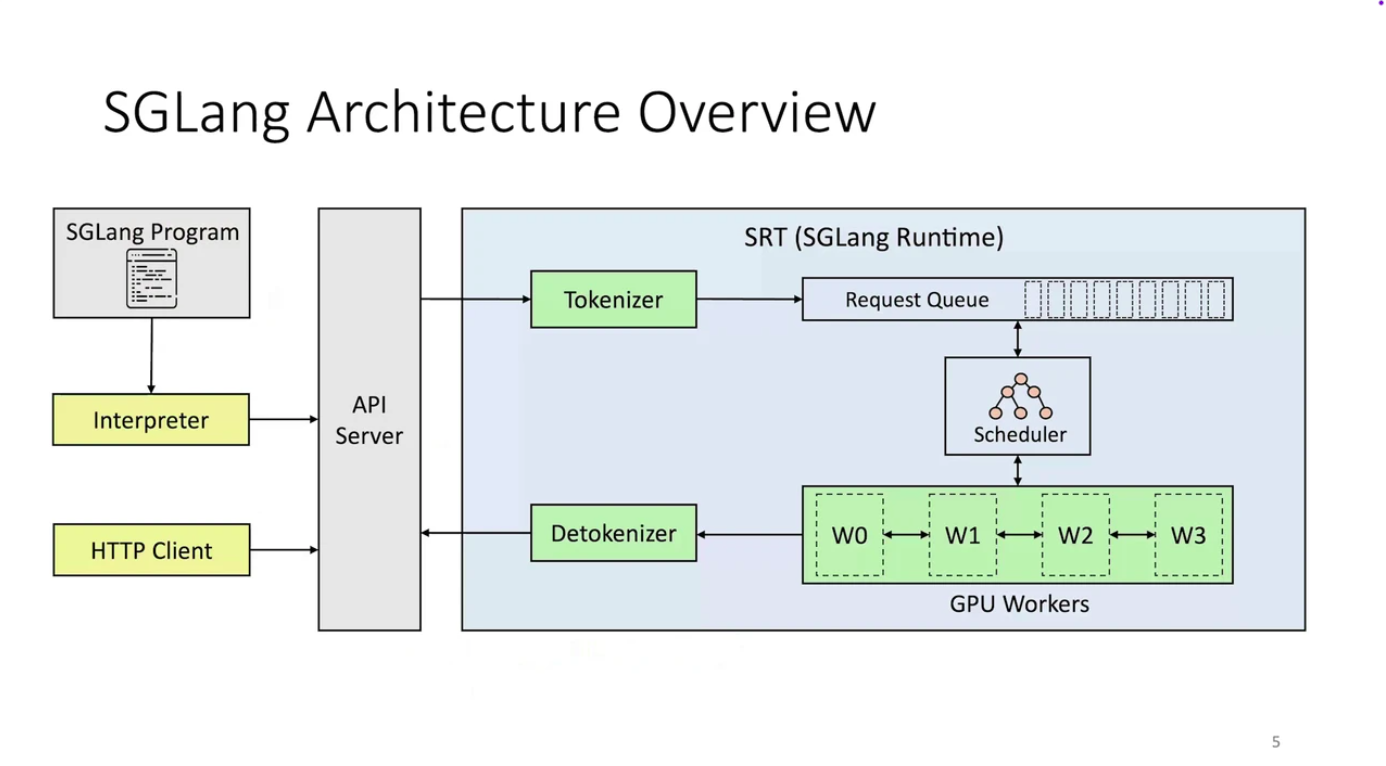
SGLang isn’t just a domain-specific language (DSL). It’s a complete, integrated execution system, designed with a clear seperation of functionality:| Layer | What it does | Why it matters |
|---|---|---|
| Frontend | Where you define your LLM logic (with gen, fork, join, etc.) | This keeps your code clean, readable, and your workflows easily reusable. |
| Backend | Where SGLang intelligently figures out how to run your logic most efficiently. | This is where the speed, scalability, and optimized inference truly come to life. |
| Primitive | What it does | Example |
|---|---|---|
gen() | Generates a text span | gen("title", stop="\n") |
fork() | Splits execution into multiple branches | For parallel sub-tasks |
join() | Merges branches back together | For combining outputs |
select() | Chooses one option from many | For controlled logic, like multiple choice |
| Feature | Traditional Engines (vLLM, TGI) | SGLang |
|---|---|---|
| Programming Model | Sequential API calls with manual prompt chaining | Native structured logic with gen(), fork(), join(), select() |
| Memory Management | Basic KV caching, often discarded between calls | RadixAttention: Intelligent prefix-aware cache reuse (up to 6x faster) |
| Output Control | Hope and pray for correct formatting | Compressed FSMs: Guaranteed structured output (JSON, XML, etc.) |
| Parallel Processing | Manual batching and coordination | Built-in fork() and join() for parallel execution |
| Performance | Standard inference optimization | PyTorch-native with torch.compile(), quantization, sparse inference |
Tutorial
Step 1: Project Setup
First, let’s create our project structure:Step 2: Configure Dependencies
The VLM we will be using is Qwen3-VL-30B-A3B-Instruct-FP8 model, which need a lot of GPU memory - we configure this in our cerebrium.toml. Cerebrium runs containers in the cloud and this file defines our environment, hardware, and scaling settings. We’ll use an ADA_L40 GPU to accommodate our model’s memory requirements. The configuration includes:- Hardware settings for GPU, CPU and memory allocation
- Scaling parameters to control instance counts
- Required pip packages like SGLang, flashinfer (our chosen backend), and PyTorch
- APT system dependencies
- FastAPI server configuration for hosting our API
Step 3: Implement the Ad Analysis Logic
One of the many great features of Cerebrium is we don’t enforce any special class design or way of architecing your applications - Just write your python code as if you were running it locally (and if you had a GPU ;). Below, we setup our SGLang Runtime Engine (Backend) with our FastAPI and load the model on startup of the container. This means we will incur a model load on the first request but subsequent requests will execute instantaneously. In yourmain.py file:
fork, which allows us to run many prompts in parallel and bring the results together in the end. This
allows us to execute alot of simulaneous requests with no increase in total latency. Lastly, we bring these results together and structure them in a specific format to return to the user.
Step 4: Deploy Your Application
Run:
Example Response
fork() for parallel processing and SGLang’s built-in output control.
You can find the complete code for this tutorial in our examples repository.